E-learning Didactic:
The Complete Guide to Effective Digital Training
23-03-24 | 8 minutes reading time
The Complete Guide to Effective Digital Training
23-03-24 | 8 minutes reading time

Dr. Kim Füllenbach
Project lead
E-learning didactic—also known as media didactic or instructional design—means aligning learning needs, the target audience, learning objectives, content, and the learning format from the very beginning—rather than starting with text, design, or interaction.
A rough concept provides the structural foundation for this. In the detailed concept, content, media, visualizations, and interactions are then worked out in concrete terms. Learning content should be designed to be understandable, relevant, and practical, and should support the transfer of knowledge into everyday work.
AI can accelerate individual steps in the design and content creation process. However, AI does not replace didactic decisions, subject-matter review, or quality assurance.
E-learning didactic refers to the systematic planning, design, and evaluation of digital learning offerings. It combines learning needs, the target audience, learning objectives, content, methods, and media into a coherent learning concept.
It’s not just about presenting knowledge in an understandable way or making a training course visually appealing. What matters most is what learners should know or be able to do after the training—and how they will later apply what they’ve learned in their day-to-day work.
Good e-learning didactic approaches therefore address the following questions, among others:
The didactic design thus forms the foundation for effective e-learning content. Only once these questions have been clarified should the actual development and production begin.
Before developing any content, it’s important to clarify what problem the training program is intended to solve. Is the goal to impart new knowledge, ensure a process is applied correctly, change behavior, or support employees with a specific task? The more precisely the learning needs are described, the more effectively the training can be designed.
Equally important is a clear definition of the target audience. What matters most is not just the learners’ job role, age, or location, but above all their prior knowledge, experience, and the situation in which they will need to apply what they’ve learned. A training program for beginners must be structured differently than one for experienced professionals.
Subject matter experts, in particular, often find it difficult to present content from the learners’ perspective. Those deeply immersed in a topic often unconsciously assume that learners already understand the connections and terminology. This phenomenon is also known as the “curse of knowledge.” A well-designed didactic framework helps shift perspectives and tailor content to the level that is actually needed.
In addition to learning needs and the target audience, the framework conditions should also be clarified early on:
Depending on the project, relevant stakeholders may include L&D or HR, subject matter experts, project management, IT, and, if applicable, communications, data protection, or compliance. Bringing these perspectives together early on helps avoid later coordination loops and fundamental changes to the concept.
At the end of this analysis, there should be a shared understanding of who the training is being developed for, what its objective is, and under what conditions it must function. Only on this basis can appropriate learning objectives and formats be derived.
Once the learning needs, target audience, and framework have been clarified, specific learning objectives are derived from them. These describe what learners should know, understand, or be able to apply after the training. The more precisely these objectives are formulated, the easier it is to select appropriate content, methods, and performance assessments.
A proven approach is to distinguish between overarching, general, and specific learning objectives:
An example:
The Bloom’s Taxonomy of Learning Objectives provides helpful guidance for formulating specific learning objectives. It distinguishes between various cognitive requirements—from remembering and understanding to applying and analyzing, all the way to evaluating and creating. Whenever possible, a learning objective should be formulated using an observable verb.
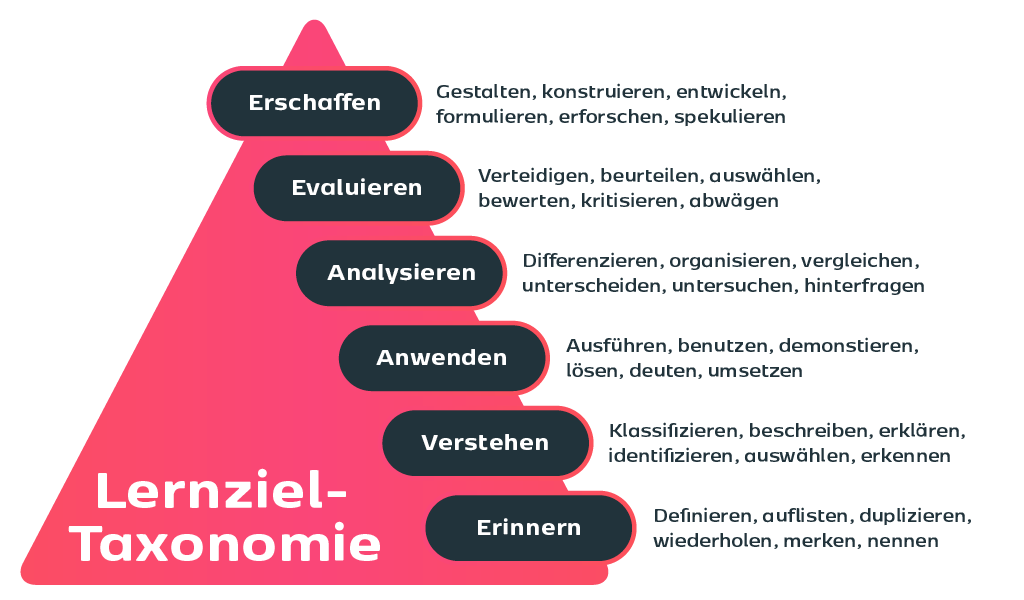
Instead of a vague objective such as, “Learners are familiar with the new approval process,” a measurable statement is more helpful: “Learners can review an invoice based on the established criteria and assign it to the correct approval step.”
The following learning objective matrix schematically illustrates how learning objectives can be assigned to the different taxonomic levels and linked to appropriate assessment methods.
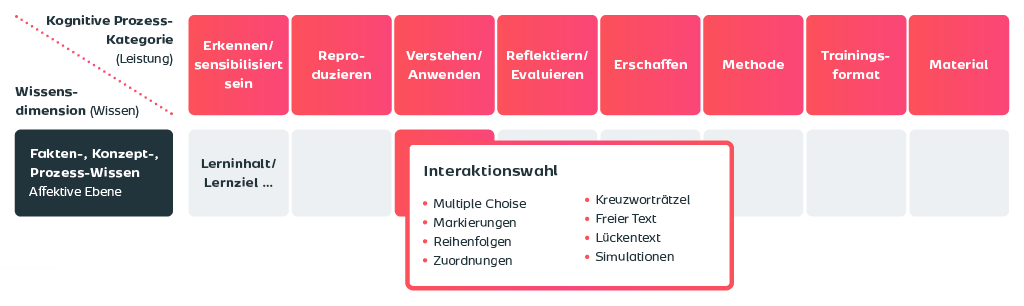
A well-defined learning objective serves as the foundation not only for the content but also for selecting the appropriate learning format. After all, not every format is suitable for every objective. An explainer video can clearly convey concepts, but it offers little opportunity to apply a complex process on one’s own. A simulation or an interactive scenario is better suited for this purpose, but requires a greater production effort.
When selecting a format, we base our decision, among other things, on the knowledge acquisition model. It divides the learning process into four phases:
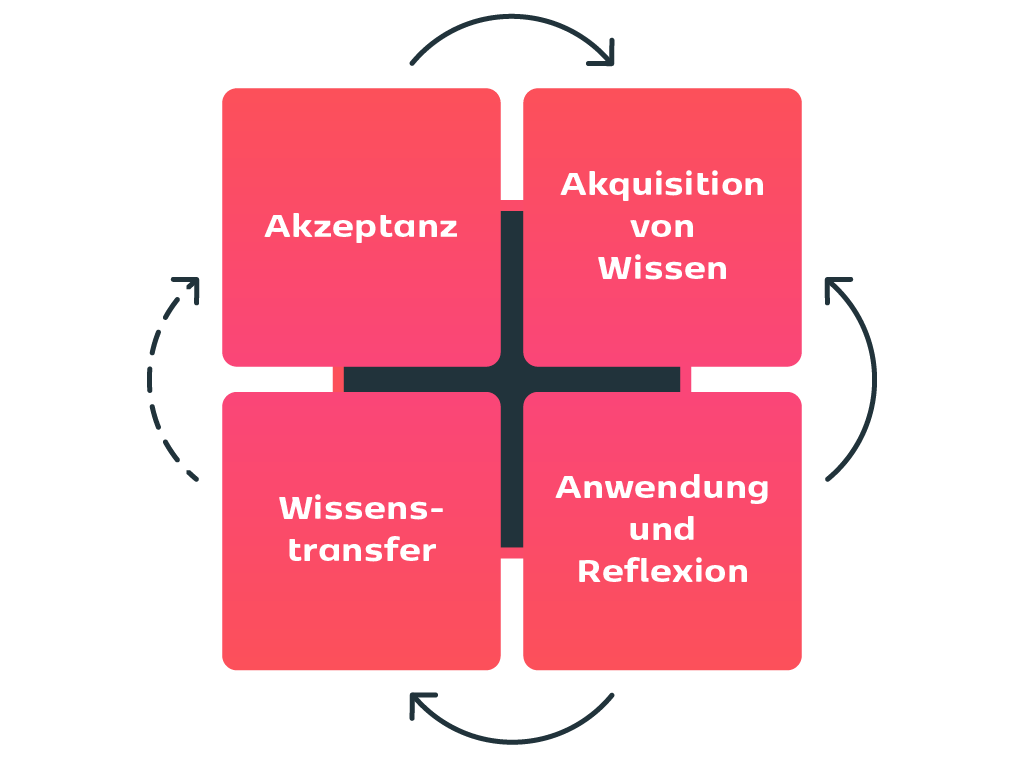
Different methods and formats are suitable for each phase. A short video or a specific problem scenario can generate interest and acceptance. WBTs, instructional videos, or microlearning formats such as “learning nuggets” are well-suited for systematic knowledge building. Simulations, case studies, and interactive activities support the application of knowledge. Checklists, worksheets, review prompts, or performance support resources can facilitate knowledge transfer.
In addition to the learning phase, the type of content also plays an important role. Regulatory topics, for example, pose different challenges than software training, product knowledge, or behavioral changes. That’s why we don’t consider the learning phase, content type, and learning objective in isolation, but rather as a whole. From this combination, we can determine which methods and formats are particularly suitable for the specific learning initiative.
At youknow, we use a topic/module matrix that brings both perspectives together: It compares the four learning phases with different types of training and helps select suitable methods and learning formats for each specific use case.
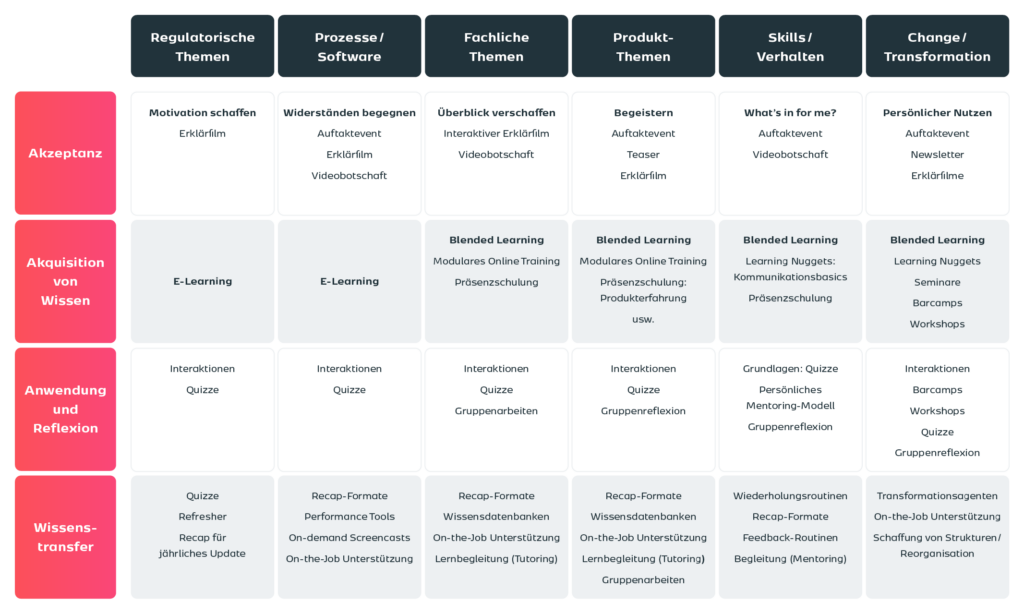
The key question, therefore, is not: What format do we want to produce? Rather: What should the learners be able to do afterward—and which learning activity best supports them in achieving that?
Once the learning objectives, target audience, and learning format have been defined, the key decisions are consolidated in the high-level concept. It forms the basic framework of the learning initiative and establishes a common working basis for all project participants.
A high-level concept typically includes:
At the center is the structure tree. It shows at a glance how the training is organized and which content is covered in what order. Often, the broad learning objectives can be represented as chapters or modules. The specific learning objectives then help to structure the content within these chapters and to plan appropriate exercises or interactive activities.
The following diagram shows an example of a structure tree.
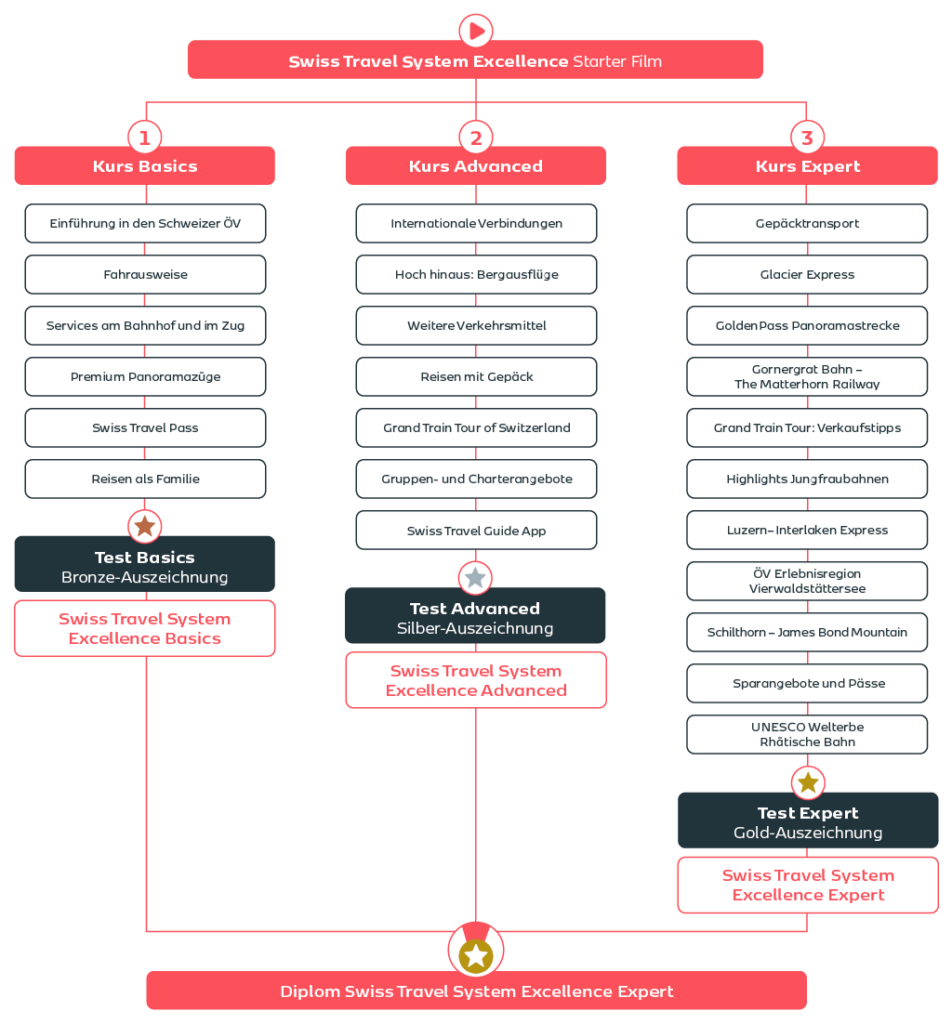
A good structural outline is as concise as possible and as specific as necessary. It should not yet contain fully written text, but should already make clear:
In this way, the rough concept serves two purposes: It facilitates coordination within the project team and prevents time from being invested too early in text, design, or media when fundamental questions remain unanswered.
This is particularly important when dealing with complex topics. In our e-learning projects, we often find that more content is planned at the outset than is necessary for the actual learning objectives. The rough concept helps set priorities, identify redundancies, and consistently focus on what learners actually need. Only once the rough concept has been agreed upon does the detailed development in the detailed concept begin.
Once the high-level concept has been approved, detailed development begins. The detailed concept specifies exactly how the content will be delivered: What text will learners see or hear? What visuals will aid their understanding? Where will they be actively engaged? And what feedback will they receive?
The central working document is usually the storyboard or script. It describes the learning activity page by page or scene by scene and, depending on the format, includes, among other things:
A good detailed design translates the didactic decisions from the rough concept into a concrete learning experience. Learning objectives, content, and methods should therefore remain closely linked at this level as well. An interaction is not useful simply because it provides variety. It should enable learners to apply knowledge, make decisions, recognize connections, or practice a specific action.
Visualization is also planned in the detailed design not only from a design perspective but also from a didactic one. Images, graphics, and animations should make information easier to understand, provide orientation, or illustrate complex processes. Purely decorative elements, on the other hand, can demand additional attention or increase cognitive load without supporting learning.
Feedback is also particularly important. When an answer is incorrect, it should not merely be indicated that it is wrong. Helpful feedback explains why an answer is incorrect, addresses common misunderstandings, and supports learners in arriving at the correct solution. The detailed concept thus establishes a binding foundation for editorial work, design, development, and subject-matter coordination. The more precisely the concept describes how the learning activity is intended to function, the more efficiently it can subsequently be produced and reviewed.
Accessibility should be considered from the very beginning. This includes, for example, understandable text, clear navigation, sufficient contrast, alternative text for images, and captions or transcripts for audiovisual content. If such requirements are not checked until the end of the process, making adjustments is usually much more time-consuming.
Even a well-planned training program is only effective if the content is presented in a way that is understandable, relevant, and practical. Six principles are particularly important in this regard.
1. Consistently Take the Target Audience into Account Every explanation, exercise, and visualization should align with the learners’ prior knowledge and work situation. The less prior knowledge learners have, the more important context and the “why” question become. Experienced target audiences typically need more action-oriented information.
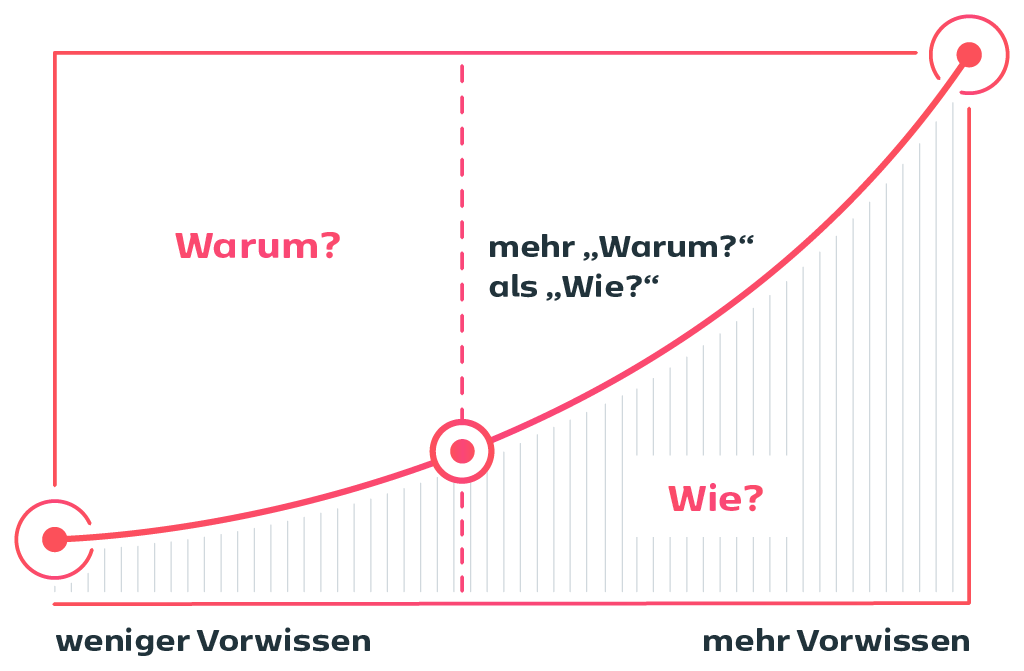
Subject matter experts should also be mindful of the “curse of knowledge”: Those who are deeply immersed in a topic often unconsciously assume that others are familiar with certain terms and concepts.
2. Streamline Content to the Essentials Good e-learning content does not cover every aspect of a topic. It focuses on what is truly necessary to achieve the learning objectives. Clear core messages help prioritize content and eliminate unnecessary details.
3. Write in a way that is clear and tailored to the target audience Short sentences, active voice, concrete examples, and a direct tone are helpful. Technical terms may be used if they are relevant to the target audience—but should be explained in an understandable way if necessary.
4. Use Stories and Examples Effectively Storytelling can make abstract concepts more tangible. Often, all it takes is a realistic starting point, a representative character, or a typical decision from everyday work life. The key is that the story supports the learning objective.
5. Using Visuals Didactically Images, diagrams, and animations should clarify processes, relationships, or structures. Purely decorative elements, on the other hand, can quickly distract from the main point. A clear design also helps learners find their way around.
6. Facilitate Application, Interaction, and Transfer Interactions should always be derived from the learning objective. Quiz questions test knowledge; case studies and decision-making scenarios promote application; and simulations support the practice of specific procedures. Helpful feedback not only explains whether an answer is correct or incorrect, but also why. For transfer, suitable tools include checklists, work aids, review prompts, or performance support resources integrated directly into the work process.
AI can accelerate many steps in the design and creation of e-learning content. For example, it can help formulate learning objectives, structure content, generate text variations, or develop ideas for interactions and visualizations.
However, it is crucial not to equate AI with didactic quality. Whether a training program is suitable for the target audience, conveys the right content, and supports knowledge transfer remains a conceptual task. Furthermore, subject-matter review, quality assurance, and compliance with requirements such as accessibility or data protection cannot simply be outsourced to an AI system.
At youknow, we therefore use AI as a supportive tool. It can provide ideas and simplify work steps, but it does not replace the many years of experience required for a coherent learning concept.
AI Authoring Tools such as knowtion go one step further: They not only assist with text creation but also with structuring entire training programs. This can make content creation more accessible, especially for those new to e-learning. However, it’s still essential that the results be reviewed and adapted to the target audience, learning objective, and application scenario.
Educationally valuable e-learning content isn’t created solely through the design of individual pages or interactions. The fundamental questions are crucial: What problem is the learning activity intended to solve? What should learners be able to do afterward? And how can this goal be effectively supported?
A structured design process lays the foundation for this. The high-level concept links the target audience, learning objectives, content, and learning format. In the detailed concept, these elements are translated into specific texts, visualizations, interactions, and feedback. The key is not to use as much content or as many technical features as possible, but to make the right decisions for each specific use case.
AI can significantly accelerate this process today. However, didactic quality continues to stem from a clear concept, subject-matter review, and a consistent focus on the learners. At youknow, we therefore combine didactic design, creative content development, and technological capabilities to create digital learning solutions that not only impart knowledge but also make a difference in everyday work life.
Dr. Kim Füllenbach

Annalena Moritz
Account Manager
Discover the ideal e-learning solution for you! Simply contact us via the contact form, by e-mail or call us directly. Let's get started together!